
Do you ever wonder if the Apple Vision Pro has virtual reality (VR) capabilities? You’re not alone. When Apple announced this new major product back in June 2023, I was excited but also very confused. The tech company positions the Vision Pro as a spatial computer or even a 3D camera, so I’m unsure if it even offers VR.
Upon further research, I discovered that the Apple Vision Pro does have virtual reality features. In fact, this device functions more like a VR headset instead of a spatial computer, no matter what Apple says.
However, the Apple Vision Pro is different from many standalone VR headsets today, and I’ll show you how below. But first, let us look into the virtual reality capabilities of this product.
Does the Apple Vision Pro Do VR?

Yes, the Apple Vision Pro is a virtual reality headset. However, Apple avoids using the word “VR” when describing and advertising this product. Instead, Apple CEO Tim Cook calls the Vision Pro a spatial computer or a 3D camera. I’m not sure why the company branded it this way. I’m guessing it leaves wiggle room for future technology, such as AR glasses.
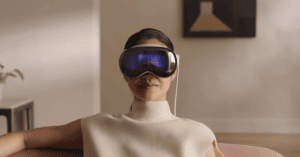
For now, let us focus on the Apple Vision Pro headset. Considering its looks alone, this device looks similar to any other VR headset on the market. It has a traditional enclosed design with large goggles and thick headbands. But since it is an Apple product, it manages to pull off a sleeker look.
The Apple Vision Pro units have micro OLED displays, which project both the virtual and real world. They feature passthrough cameras for an augmented reality or mixed reality experience. There is also a digital crown dial that controls the level of AR/VR immersion. If you adjust it to the lowest setting, other people can see your eyes behind the Apple headset. This is all thanks to the EyeSight external display feature.
However, unlike real AR headsets, the Apple Vision Pro doesn’t make the display transparent to the user. Yes, you can view the real world, but only through the OLED screens. And while the device has a wide field of view, you can still see the edges of the Apple Vision Pro cover your peripheral vision.
Plus, the Apple Vision Pro can completely obscure your view and transport you to a virtual environment. That is essentially what virtual reality headsets do.
Overall, the Vision Pro hardware DNA is based on VR technology instead of AR or augmented reality.
What Can You Do With the Apple Vision Pro?
By now, you know the the Apple Vision Pro functions more like a VR headset than a mixed reality device. But what exactly can you do with this device?
Below, I have listed the primary applications of the Vision Pro.
Using the Apple Ecosystem

The Apple Vision Pro headset uses visionOS. It builds on previous Apple operating systems like the macOS, iOS, and iPadOS.
This VR headset offers the same App Store that Apple users are familiar with. It can support iPhone and iPad apps at launch.
Having the Apple ecosystem also allows the Vision Pro to integrate with Apple Watches and Mac desktops. The headset is essentially a wearable Mac monitor that you can use without being constricted to one place.
Plus, the Vision Pro is compatible with the AirPods Pro via the USB-C cable. It delivers lossless audio for an enjoyable VR experience.
Consuming Content

The Apple Vision Pro features two micro‑OLED displays, each with 23 megapixels. The headset boasts a 4K resolution, which is perfect for viewing different media.
It can stream movies and shows from Apple TV app, Disney Plus, and Max. The ultra-high-definition display and advanced spatial audio system deliver an immersive experience. There is no need to go to cinemas to enjoy your favorite blockbuster films. The VR headset transforms your room into a personal movie theater.
The Vision Pro also lets you view photos and videos that you took, whether in 2D or 3D. Simply launch the Photos or Apple Immersive video app. Use hand gestures to swipe between different files or zoom in/out as you see fit. You can also shift your gaze, which the device automatically detects and changes the perspective of the image.
Playing VR Games

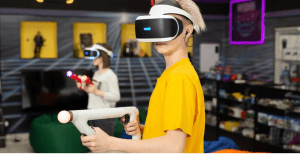
Apple’s Vision Pro headset is also great for playing virtual reality games. It offers more than 100 games in the Apple Arcade, so feel free to download your favorite iPad apps. These include the NBA 2K23, which is only available in Apple Arcade.
Plus, the VR headset is compatible with Bluetooth game controllers. These give you more control over your in-game movements.
Calling Family and Friends

Engaging in calls is another thing you can do with the Apple Vision Pro. You have access to FaceTime to talk to family, friends, and even officemates. You can adjust the tile display of the person, depending on your preference. Small tiles let you focus on other things in the background while still engaging in conversation. Meanwhile, expanding the tiles to a full-screen view makes you feel like you’re talking to someone in front of you.
You can even share files and apps with others through the SharePlay app. You continue to see everyone in large video tiles while using the same app. This feature is extremely useful in collaborative work.
Conclusion
Apple advertises the new Vision Pro as a spatial computing device or a 3D camera, the first of its kind. However, this device functions like a VR headset with mixed reality features. It projects an ultra HD display on a screen that replicates a real-life environment.
Do you have other questions about VR headsets? Feel free to check our blog for similar content!