

I’ve always wanted to own a virtual reality headset, but I find the steep price of some products ridiculous. So, when I discovered the Cynoculars with its cheap price tag, I didn’t hesitate and purchased it right away. This article contains my detailed review of the Cynoculars virtual reality headset.
I find the Cynoculars a decent VR headset for its price. I love how easy it is to use—I simply insert my phone, and the headset turns it into a virtual reality player. The features are limited, but you really can’t complain much about its price. I recommend this for beginners who want to try VR.
Below, I’ll talk more about the benefits and drawbacks of using the Cynoculars VR headset. I also researched multiple sources that share the Cynoculars features and user feedback. But first, I’ll cover the background of this product.
What Is the Cynoculars Virtual Reality Headset?

The Cynoculars is a virtual reality (VR) headset from the Hype brand. It is available in major online retailers, such as Amazon and Walmart.
The Cynoculars VR headset transforms your smartphone into a virtual reality player. It magnifies the phone screen to offer a 360-degree view of the image or video.
The product comes with a free remote. This item lets you control the headset for VR gaming or movie streaming.
The Cynoculars isn’t a standalone VR headset with built-in apps and software. Instead, it uses your phone to play VR games or view immersive media without the need for cables. Simply download virtual reality apps from Apple or Android stores.
An Honest Review of the Cynoculars Virtual Reality Headset
I’ve owned the Cynoculars for quite some time now. Here are my honest thoughts about the VR device.
Features and Benefits
Let me start with the features of the Cynoculars virtual reality headset and my opinion of them.
- It turns your smartphone into a virtual reality device
- 360-degree view with a wide-angle cinematic perspective
- It can fit most smartphones with a maximum width of 3.875 inches and height of 6 inches
- It is compatible with iOS and Android operating systems
- Flexible head straps
- Lightweight and comfortable
- Adjustable pupil and focus point lengths
The Cynoculars is a simple headset that can make my regular phone into a virtual reality player, similar to the Google Cardboard platform. I like how straightforward and effective it is for VR applications. I’m confident that beginners in VR won’t be overwhelmed by the features of this device.
Many online reviews share the same sentiments. They had fun using the Cynoculars and thought it perfectly suited beginners. Some even gifted this VR device to their loved ones, who enjoyed it.
Design & Build Quality
The Cynoculars looks like your average virtual reality headset. There is nothing special to write about. But that is exactly why I love this VR headset.
The straightforward design is ideal for children and beginners in virtual reality. It is also great for individuals with prescription glasses. One can comfortably wear the Cynoculars without removing their glasses, so they can enjoy a full HD immersive experience.
Another thing I like about this VR device is the built-in memory foam padding. I can use the Cynoculars for long periods without the plastic material causing pain and discomfort. Plus, I appreciate the additional head strap. I find that it prevents the VR goggles from sliding off my head.
The Cynoculars virtual reality headset also comes with a secure cartridge. This is where I insert my phone. I feel confident that the included cartridge won’t fall off while I’m using the headset because of its practical design.
The only downside for me is the free remote included in the package. I find the buttons flimsy and difficult to press.
However, some users find the display too blurry for their liking. But it might just be a result of having wide-set or narrow eyes. Fortunately, you can adjust the lens spacing and focus on the Cynoculars.
Performance
Performance-wise, the Cynoculars virtual reality headset is average at best.
It does what it promises, which is to turn a smartphone into a VR player. I like how it magnifies my phone screen and offers a 360-degree view. I can browse photos and videos in a new way. I can also play 3D games by downloading VR apps on the Google Play Store.
However, the Cynocular VR headset has limited features. I cannot use other phone apps, such as Notes and social media platforms. I also found some photos and videos blurry or fuzzy at the edges, which led to motion sickness after continued use of the device.
Plus, the remote is disappointing. It performs inconsistently—it is responsive sometimes, but it fails to work on other apps.
I also read other online reviews and found out that Apple users had compatibility issues. I couldn’t comment on this aspect because I own an Android smart phone. However, based on the feedback, iPhone users only got limited apps. The remote also didn’t work properly, with only a few buttons functioning.
Ease of Use
The Cynoculars VR headset is relatively easy to use, despite the lack of a detailed product manual.
You simply insert your smartphone into the removable device cartridge. Then, reattach this part to the headset, and you’re done. You can now view photos and videos through the goggles. If the display looks blurry, you can easily adjust the focal point or interpupillary distance.
It is also easy to download VR apps that you can use on the Cynoculars. Use the free remote to navigate and launch the apps. However, you must insert two AAA batteries inside the remote. These batteries are not yet included when you buy the VR device.
And as mentioned above, you may have difficulties controlling the Cynoculars if the remote malfunctions. Try changing the batteries to see if that fixes the problem.
Cost
One of the most significant benefits of the Cynoculars is its affordable price. It offers a decent VR experience for around $20. Some retailers even sell this device for less than $10.
You shouldn’t expect much of this product. Many users do, but they often get disappointed because of the limited features.
Overall, the Cynoculars is among the cheapest virtual reality headsets you can buy today. It produces an immersive world by transforming your phone’s display. It is a solid choice for those who want to experience VR for the first time.
What Are Great Alternatives to the Cynoculars?
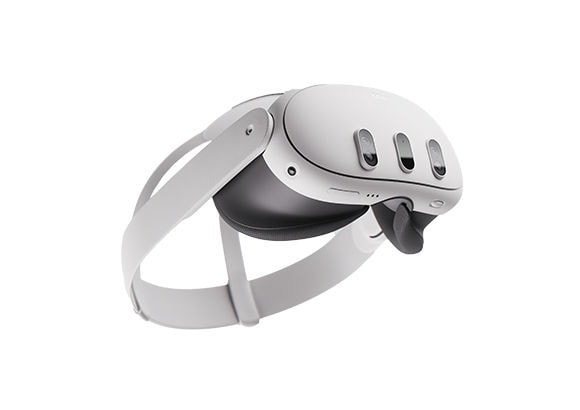
If you’re willing to shell out money for a virtual reality device, you can find better alternatives to the Cynoculars. Below are just some of them.
- Meta Quest – It is one of the best VR headsets you can buy today. It has two RGB cameras with high-fidelity passthrough, advanced sensors, a fast processor, and a vast library of VR media.
- Meta (Oculus) Rift – Before the Quest, this device was among the most popular VR headsets. It features high-resolution LCDs, responsive controllers, a robust processor, and access to countless games.
- Samsung Gear VR – This lightweight and compact VR device is perhaps the most similar to Cynoculars. It also turns your phone into a VR player, but it only works with Samsung models.
- Pansonite VR – This mobile phone VR headset has built-in headphones, adjustable lenses, and compatibility with most phones. However, it is more expensive for what it offers.
- Merkury Innovations Evo VR – It is a simple mobile phone VR headset with augmented reality capabilities.
Buying Guide: What to Consider When Buying a VR Headset?
If you’re still unsure about buying the Cynoculars or any VR device, fret not. Below, I’ll teach you the factors to consider before purchasing one.
- Standalone or tethered – The latter has a powerful computer built into the headsets, which runs all the programs. Meanwhile, the former relies on a separate desktop to work. If you want portability, go with standalone headsets. But if you want better graphics and faster speeds, a tethered device is the way to go.
- Wired or wireless – This is pretty self-explanatory. Most standalone VR headsets are wireless, giving you a wide range of movement. However, some need to connect to an external battery pack, which still requires a cable. A wired VR device ensures a lossless experience, ideal for fast-paced games.
- Resolution – You don’t necessarily need a VR headset with 4K resolution. But if you want an immersive experience when watching movies or playing games, it wouldn’t hurt to buy a device with ultra HD resolution.
- Comfort – The last thing you want is a VR headset that hurts your eyes or head every time you use it. Consider products with adjustable headbands and interpupillary distance as well as built-in paddings.
- Apps – You should also consider the apps the VR headset offers. For example, if you’re into gaming, you want to buy a device with access to the Apple Arcade or Google Play Store. The same thing applies to movie and TV enthusiasts. You want to look for VR headsets that can launch Netflix or Disney Plus.
- Price – The cost is among the most important things to consider when buying a VR device. You can find many options on the market, from cheap ones to very expensive models. Choose one that suits your needs.
Conclusion
The Cynoculars virtual reality headset has several positives going for it. I highly recommend it for its straightforward design, easy-to-use interface, and affordable price tag.
But if you prefer a headset with advanced specs, you might be disappointed with the Cynoculars. Consider my other recommendations above instead.
Decided to buy the Cynoculars? Use this link to purchase it today!