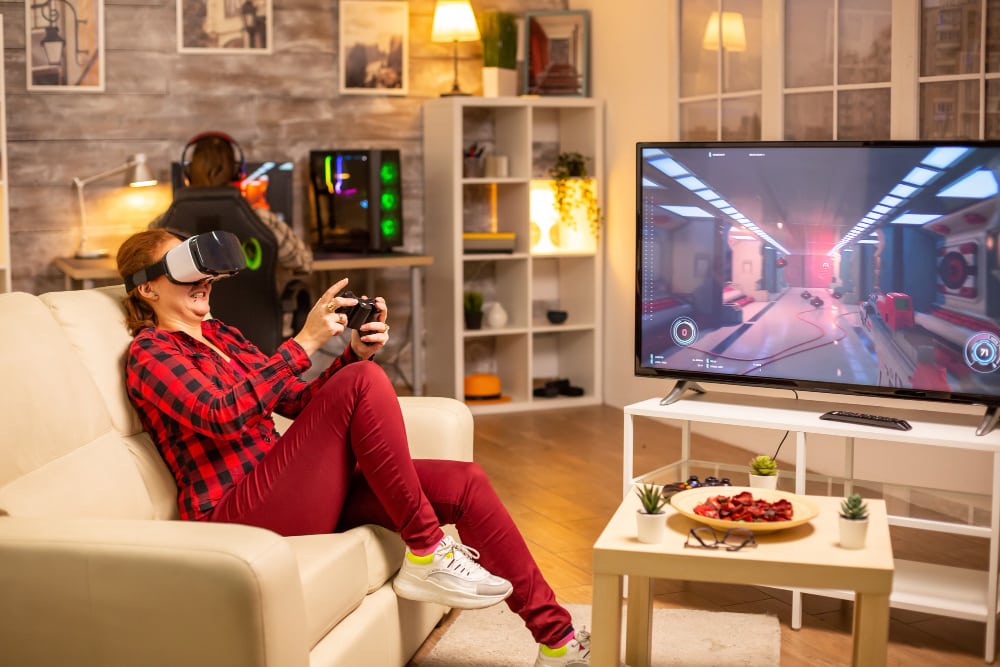
Have you already gotten your hands on a VR headset and want to set up your very own VR room? It will definitely be more fun to have a VR experience where you can freely move around without bumping into your furniture.
It is recommended to have at least 6.5 ft x 5 ft to be able to enjoy an immersive VR experience.
But, who’s to say you can’t enjoy VR when you have a small space? You can definitely have a great VR experience even when you are seated or just standing in place.
Whether you have a large or small area, you can definitely have a space dedicated to your VR needs. In this article, you will learn how to set up your room for the ultimate VR experience.
How Much Space Do You Need For VR?
The space that you need for VR setup will depend on the VR headset that you have. And, it will also depend on what VR experiences you will use it for.
If you are using it for a VR movie experience, you won’t need a lot of space unlike when you use the VR space for gaming.
You definitely need a lot of space to move around to ensure you don’t hit any objects. Your VR space should at least be 6.5ft x 5 ft so you can have a comfortable space to play in. Meta has a Guardian system built-in on the Rift S and Quest 2 that lets you set boundaries and alerts you if you are too close to the edge of your play area. You can set the Guardian boundary system on Stationary mode and room-scale mode.
You also want to consider the setup of your gaming PC in your space as some games can only be played on a PC. But there are standalone VR headsets that you can use.
You don’t need a lot of space but if you want a realistic and immersive VR experience, you want to make space for it.
How to set up a VR room

If you want a full virtual reality experience, you want a clear space where you can move around freely.
A room-scale play is best if you want to have a more immersive VR experience. For this, you have to have a dedicated space for your VR setup. But, if you do not have enough space, you can still have your VR experience while seated or standing in place.
Whether you are playing seated or standing, or want a room-scale experience, make sure you are not hitting any furniture when you move.
Clear your space
As we keep on mentioning, you need a clear space for the best VR experience. Not only because of that but for your safety as well.
A nice spacious area is optimal for an immersive VR experience, especially when gaming.
Some VR experiences require you to move a lot and a small area with a lot of furniture around can be hazardous. You can trip and injure yourself if you do not have enough room to move freely.
Even if you are aware of where your furniture is placed, you might not notice that you are getting too close to it when you are engrossed in your VR experience.
You also want to make sure that your ceiling height is high enough that you don’t hit it when you raise your arms. Dangling lights and ceiling fans can be very dangerous if you have a low ceiling. If your VR room has a low ceiling, you might want to control your over head motions so as not to injure yourself or damage your controllers.
Better to clear up the space than to be injured.
Avoid reflective surfaces in your VR room
If you are facing tracking issues when using your headset, you might want to check if you have mirrors or pieces of furniture that reflects light.
Reflective surfaces such as mirrors and windows can cause tracking issues with your controller and headset. The light reflecting from the mirror can confuse the tracking system which can make you dizzy.
You also might want to close your curtains when you are using your headset as the light can also reflect in your windows. Your headset lenses can also be damaged when exposed to direct sunlight for a long time.
Well-lit room
But, I thought we need to close the curtains so it does not cause tracking issues?
Yes, but you also need to play in a well-lit room so that the tracking stations can see and track your movement. This allows for smooth gameplay and less lagging.
Some VR users report that playing in total darkness messes up their tracking as well. But, some users like to play in the dark and it does not give them tracking issues. The room does not have to be totally bright or super dark. As long you avoid having reflective surfaces in your VR space.
So, if you are facing tracking issues and you’ve already done all the restarting and rebooting, there might be a reflective surface in your room that is messing up your tracking system.
What kind of flooring should I use in my VR room?
If you have tiles or marble flooring, you might want to cover it up, especially if it reflects light. This can cause tracking issues with your controller or headset.
Some VR titles require you to crawl, run, or jump so you want to have flooring that is safe to do all those actions. You don’t want to suddenly slip mid-game because your floor is too slippery.
You can put a carpet that is the size of your play space. The carpet can also act as your border as some VR headsets can track the rug, especially if it has details, so you know when you are almost at the edge of your play space. Just make sure to check that the carpet will not move when you are moving.
Another option could be to get those interlocking foam tiles so there is a little bit of padding on your play space.
VR storage
If you have a dedicated VR space, you also want to have a storage solution that can keep your space organized. Aside from a VR headset, you might also have real-world props lying around that you use for your VR experiences.
VR headsets and props can easily be stored by having wall mounts where you can display your VR gear.
You ideally want to keep your headset away from direct sunlight so as not to damage the lenses. For this, cabinets are a good storage solution for your headset. Closed cabinets can keep sunlight away but you have to clean them often as dust can accumulate on the lenses.
But, if no sunlight will hit your wall mount storage, you can definitely display your VR headset for everyone to see!
Just make sure your storage solution is not in the way so you don’t accidentally bump yourself into it.
Base stations
VR headsets have base stations that track your movement. This is why you want to avoid reflective surfaces in your VR room.
It is recommended to have at least two base stations especially if you have a room-scale setup. Some base stations can be mounted on a wall while some can be put into stands.
Take the size of your room into consideration when setting up your base stations. You don’t want to set up the tracking systems on tripods if you have a smaller room as tripods can take up too much space.
Room-scale VR vs Seated VR vs Standing VR

Your setup will depend on the amount of space you have.
If you do not have a dedicated room for VR, a headset like the Meta Quest 2 is wireless and you can use it in any room you prefer. But, other headsets need to be connected to a PC so you will have to make room for your gaming.
Seated and standing experiences won’t need as much room but you still need more room when you play VR titles.
Seated VR and Standing VR
If you do not have enough space or you just prefer to sit down when playing VR titles, you can definitely make space in your living room.
If you prefer to stand, just make sure you have enough room to move around, especially with overhead movements. You don’t need a larger area; if you are worried about hitting the furniture, you can move your coffee table to make some room.
Some seated or standing VR titles are:
– Beat Saber
– Moss
– Brass Tactics
Room-scale VR
For the best VR experience, you want to have a room-scale VR.
Room-scale VR gives you the ability to move freely for a more immersive virtual reality experience. It is not designed to limit the user’s experience, instead, it allows you to move around naturally.
If you have an HTC Vive headset, the recommended play area is 2 m x 1.5 m (6.6 ft x 5 ft) for a room-scale setup.
For Oculus Quest users, you need at least 2 m x 2 m (6.5 ft x 6.5 ft) of the play area for a safer and more comfortable VR experience.
Both headsets can be used for seated and standing VR if you have a smaller space. There is no minimum space requirement if you want to have a seated or standing VR experience.
Some Room-scale VR titles are:
– Skyrim
– Rise of the Tomb Raider
– Pangman
Other requirements for your VR room
You also need to think about other things that you need to have in your VR room. A good network connection and the specs of your PC are some of the things you need to keep in mind.
You want to make sure that your network connection can run your VR games. If you like to stream movies or play online multiplayer VR titles, a fast internet connection is needed to be able to have a smooth VR experience.
If you like to play VR games on a PC, you want to have the proper PC build. Investing in a high-quality PC can definitely improve your VR experience.
How much does a virtual reality room cost?
There is no definite number as the cost of having a dedicated VR room will depend on the kind of setup you want to have. You want to factor in the cost of the VR headset, gaming PC, and props. You might also want to have decent flooring for a safer play area.
If you already have a large enough living room, you can definitely use that space. You just need to move your pieces of furniture around to have a play space where you won’t bump into anything.
Wrap up
The bigger the room the better VR experience you will have.
While it is definitely more fun to have a big VR room, some of us just don’t have that kind of space in our homes. That should not prevent you from having a great VR experience!
How will you set up your VR space? Drop us a message – we love examples!